Skip to content

How it works

Prepare your production,
one step at a time.

Your script holds the characters, props, costumes, and places your shoot needs. Shilpi connects that breakdown to location research, the calendar, your team, and each day’s call sheet.

01 · Story Lab

Upload and review your screenplay.

Upload a supported screenplay file to Story Lab. The analysis organizes scenes and identifies details such as characters, props, and wardrobe. Check the results against your pages and correct anything that needs attention before using the breakdown to plan.
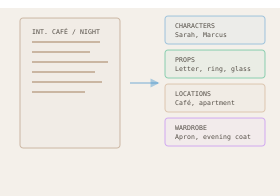
A screenplay organized into characters, props, locations, and wardrobe.
A screenplay organized into characters, props, locations, and wardrobe. Illustrative example.

Locations, props, and costumes

Prepare what goes into each scene.

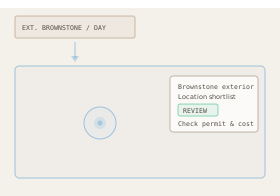
Your breakdown is the starting point. Use Scene Finder to research filming locations, prop houses, and costume shops near your shoot.

A scene description leads to a location shortlist for review.
Research places, then confirm the details. Illustrative example.

Scene Finder

Find a place that fits the scene.

Choose a city anywhere in the world. Scene Finder uses Google Maps data to find real places that fit your scene or description. Review the matches and available imagery, then save a shortlist for that scene.

Props

Find the props your scene needs.

Start with the props identified in your screenplay and the scenes that use them. Search Scene Finder for nearby prop houses or shops, then contact suppliers about the items you need.

Costumes

Prepare each character’s wardrobe.

Review wardrobe by character, including descriptions and variations from the script. Use Scene Finder to research costume rental shops, then confirm sizes, stock, and rental terms with the supplier.

Confirm location costs, permits, and supplier availability before booking.

02 · Slate

Drag scenes onto the days you want to shoot.

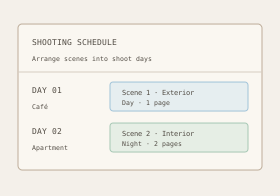
Drag scenes onto calendar dates in Slate. Move a scene to another day and its breakdown stays with it, including characters, props, wardrobe, and its saved location. Review the day’s cast, page count, and location changes as you arrange the shoot.

Scenes arranged into shooting days.
Scenes arranged into shooting days. Illustrative example.

03 · Link-to-Set

One invite link. A roster ready for your call sheets.

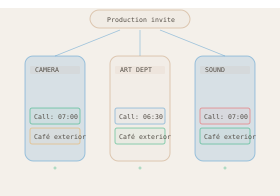
Share one production link with your cast and crew. They add their own details for free and join the production roster. The call sheet draws its scenes and cast from your shoot day; drag crew members or whole departments onto it. Review the call times and locations, then publish it to your team. Publish an updated version when the plan changes.

One production invite connects your crew with the day’s call information.
One production invite connects your crew with the day’s call information. Illustrative example.

Keep the production details close.

For your crew

Crew can open the call sheet link from their phone. Their access does not require a paid crew subscription.

More about crew access →

After the shoot

When a producer wraps a production in Shilpi, eligible crew memberships can receive a credit recording the production and role. These credits are confirmed through the production’s records.

For larger teams

Department channels give each team its own conversation inside the production.

Start with your next production.